

TEST page - Gam - NOTIFICATIONS
Notifications: To Allow or Not To Allow
An increasing number of websites are asking you to approve “notifications”. However, some web notifications are phishing attempts or intrusive advertising.
What are notifications?
Notifications are messages sent by a web page that appear outside of the browser, displayed by Windows in bottom right of the screen. They allow a web page to notify you of changes in case the browser is not currently in view on your desktop, like app notifications on a mobile device.
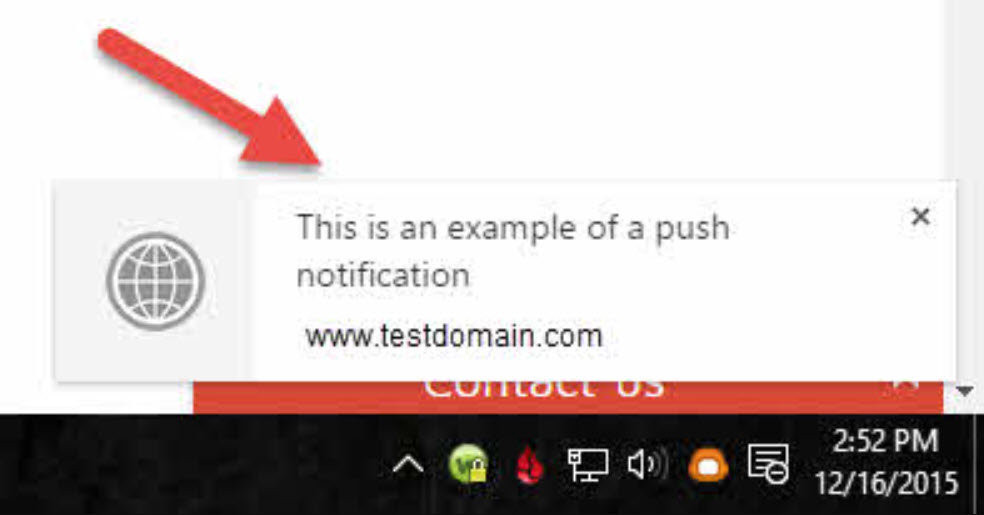
(source: https://www.mittas.co.uk/blog/google-chrome-and-the-notification-scam/)
Prompts to enable notifications
Following are a few examples that prompt you to enable a notification:

(source: https://krebsonsecurity.com/2020/11/be-very-sparing-in-allowing-site-notifications/)
Notifications About a Deal or Offer
Notice that sometimes the site is open about what it will display as a notification, such as deals or offers (aka ads):

"You are not a robot" Verification
Sometimes users are misled into enabling notifications, like the “you are not a robot” trick:

Regardless of how they get enabled, notifications can be a dangerous security issue.
Why are notifications a threat?
The problem is that most users are unable to distinguish between a browser notification designed to mimic an operating system or anti-virus notification and the real thing. When scammers send lookalike notifications designed to mislead and cause concern, many well-meaning users fall for the notification phishing and end up with malware or ransomware.
Below are some examples of deceptive and mal-advertising notifications. They are designed to look just like system messages about serious problems.

Most definitely, not what you thought you allowed.
How can I spot a web notification versus a system or application message?
The web notification standard specifies that a web notification must always specify the web domain that sent the push notification. If you look at the messages you receive, if they include a domain below the message content, then you can tell it is a web notification.
For instance, the examples above indicate that they are from domains “clickpush.biz” or “via overhedtrew.info”.
Should I allow or not?
The general advice is to block notifications. They are not necessary to use a web site.
If there are sites that you trust that have frequent updates, you can consider allowing them. However, keep in mind that browser notifications are yet another distraction during in your computing experience. You may want to decline notifications simply to have some peace of mind.