
Website Unavailable due to Planned Maintenance on May 19, from 6:00 a.m. to 9:30 a.m

All Stories

Brightspace logo

Policy and procedures documents for the Brightspace Learning Management System are now available. They clarify such processes as requests for emergency course access and integrations and describe expectations and limitations for course archiving and content storage.

Effective Aug. 20, uploaded files will be limited to 500 MB each. While this limit will not affect the majority of courses, it may affect those employing video files.

The University provides several alternatives for storage of video and other large files. Visit Storage Alternatives for Brightspace Content for options and detailed instructions for using them.

YuJa Video Enterprise Platform is integrated into Brightspace; workshops are available for those wanting to learn how to use it.

MS Teams meeting recordings are saved in the instructor’s OneDrive, making it easy to insert links instead of uploading videos to Brightspace.

Microsoft provides learning materials for Stream (on Sharepoint) and IT Services provides support.

Personalized help with Brightspace is available during summer online drop-in hours: Monday through Friday, 10 a.m. to noon and 1 to 3 p.m., or contact the support team to schedule one-on-one consultations.


student applying for grad school

The transition from the Electronic Graduate Application System (eGAS) to UWinsite Student for the graduate admissions process is now complete. This marks a significant milestone in the University’s ongoing commitment to enhancing the student experience and leveraging modern technology to improve processes, says Patti Weir, dean of the Faculty of Graduate Studies.

“The successful transition to UWinsite Student represents a significant step forward in our ability to manage graduate admissions. We are grateful to the project team for delivering a tool that enhances the efficiency of the admission process,” Dr. Weir says. “Our faculty and staff can now access graduate applicant information directly within UWinsite Student.”

To support this transition, how-to guides and videos are available on the Office of the Registrar’s website, on the Graduate Admissions Resources page.

“We appreciate everyone’s patience and cooperation during the transition. We’ve developed resources to help those who support the graduate admissions process,” says University Registrar Ray Darling. “Future students can also learn about the application process in the Ask.UWindsor knowledge-base articles.”

Marcin Pulcer, associate vice-president, Information Technology Services, says his team is excited about the capabilities UWinsite Student offers to the graduate admissions process: “Modernizing the system has been a major goal of the department for several years.”

As always, in the event of any issue with the graduate admission process in UWinsite Student, users can open a ticket. The team from the Faculty of Graduate Studies, Office of the Registrar, and IT Services will review tickets and address issues as they arise.

person using web content management system

University employees can join a Drupal training session on Thursday, May 23, to enhance their web development skills.

The online session, led by team leader Rob Aitkens, will cover creating webpages, uploading graphics, organizing menus, and understanding web standards, accessibility, usability, and functionality.

The training is open to all faculty, staff, and student employees who maintain content on UWindsor’s official website. Register for the Thursday, May 23 session, running from 1 to 3 p.m.

calendar of events

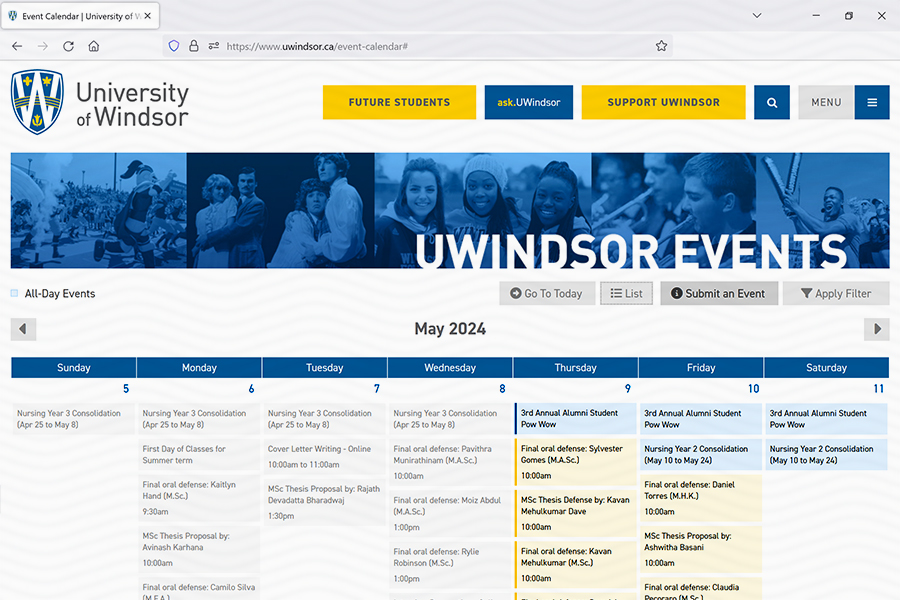
Updates to the event calendar on the uwindsor.ca website will improve its functioning as a single source for activities across the University of Windsor.

The central calendar at www.uwindsor.ca/event-calendar captures every post of events made on Drupal sites across the university’s domain. Content providers who notice that their website event listings are not shared through the central calendar should send a note to pac@uwindsor.ca to correct the omission.

UWindsor-affiliated groups which do not use the Drupal content management system may submit events for consideration by filling out the form on the calendar page or here: forms.office.com/r/K1B8d5pYvj.

man working on computer

Are you a University employee eager to enhance your Drupal web development skills?

The training session offered on Thursday, April 25, is designed to empower you with the skills needed to create and manage web pages on the official UWindsor website. Whether you are a novice or a seasoned web content editor, this session promises practical knowledge you can apply immediately.

During this training, you will learn how to:

  • Create engaging webpages
  • Understand how to upload graphics
  • Organize menus effectively for seamless user experiences
  • Learn about web standards, accessibility, usability, and functionality

Web development team leader Rob Aitkens will bring a wealth of experience to lead this session and guide you through the Drupal content management system.

This training is open to all faculty, staff, and student employees responsible for maintaining content on UWindsor’s official website.

Secure your spot in this dynamic class on Thursday, April 25, from 1 to 3 p.m., by visiting the IT Services Booking page and sign up for the Drupal 7 + Web Accessibility Basic Training.