All Stories

Message to all Summer/Intersession 2020 Instructors

Last year, a Microsoft group/team was automatically created for your course and students were added as members, based on your Blackboard roster.

The group that was created for your course is about to be expired.  This group may have been used to manage access to videos in Stream and is also the basis for a Microsoft Team, if it was activated. 

What will happen?

The name of the group (and team) will be changed to include a prefix of EXP0421.

The team will be deactivated, so students will no longer be able to access resources in the team.

Students will still be members of the group, so if you use the group to limit access to Stream videos, students will still be able to view the video.

What can you do?

If your students still need access to the resources in the team, you can activate the team, just like you did at the start of the semester, by pressing the Activate button in the banner when you enter the team.

How can you change access yourself?

If you want your group-protected Stream videos to be not viewable by your students, you will need to modify the permissions on the video or the channel and remove the class group from the list. More information: Article - Publishing and sharing videos in Microsoft Stream

If you activated a team, you could delete the team if it is no longer required by accessing the three dots menu on the team icon (see image below).   This will remove the group as well. After 30 days, the Teams data will be permanently deleted. Stream videos will remain with corresponding group access removed.
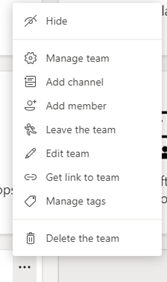
You can hide the expired team from your list of teams by selecting Hide from the three-dots menu on the team tile. This will keep the team and group name preserved.


Tech Talk logo

More than 35 per cent of traffic on University of Windsor websites is coming from mobile devices. Building and maintaining a mobile-friendly website helps ensure a better experience for all users.

Watch Information Technology Services team member Gam Macasaet as he walks through tools to check the mobile-friendliness of your Drupal 7 website and tips for improving this feature in this 120-second Tech Talk video.

If you want more information about Drupal, click on the link in the Comments section below the video.

Tech Talk is a presentation of IT Services. More Tech Talks are available at www.uwindsor.ca/its/tech-talk.

Tech Talk logo

Microsoft Lists is an app that helps users track information and organize work.

In the Microsoft Lists – Beginner 1 Tech Talk, the app’s basics — including creating lists and adding, editing, and removing items — were introduced.

Information Technology Services team member Jonathan North builds on these fundamentals in Microsoft Lists – Beginner 2 Tech Talk. Watch as he demonstrates how to share a private list as well as share lists with a team in this 102-second video.

Tech Talk is a presentation of IT Services. More Tech Talks are available at www.uwindsor.ca/its/tech-talk.

Tech Talk logo

Microsoft Lists is an app that helps you track information and organize work.

With Lists you can stay on top of what matters most to you and your team. Use it to track issues, assets, routines, contacts, inventory, and more using customizable views. Then leverage its smart rules and alerts to keep everyone in sync. With ready-made templates, you can quickly start lists online, on the mobile app, and directly from within Microsoft Teams.

Watch Information Technology Services team member Jonathan North as he introduces Lists basics — including creating lists and adding, editing, and removing items — in this 117-second Tech Talk video.

Tech Talk is a presentation of IT Services. More Tech Talks are available at www.uwindsor.ca/its/tech-talk.

Nick Keren

The University community came together Feb. 25 for a virtual presentation honouring the 2020 recipients of Employee Recognition Awards. The program, co-ordinated by Human Resources, recognizes the outstanding contributions and dedication of employees to advancing the University’s mission.

Thursday’s event celebrated these honorees:

  • Excellence in Leadership Award — James Yaworsky, review counsel, Community Legal Aid
  • Excellence in Health and Safety Award — Michelle Bondy, learning specialist, Faculty of Science; and Research Safety Committee (view the list of team members)
  • Impact Award (Individual) — Nargis Ismail, organic analysis lab co-ordinator, Great Lakes Institute for Environmental Research; and the Centre for Teaching and Learning and the Office of Open Learning (view the list of team members)
  • Service Excellence Award (Individual) — Alison Samson, director of graduate academic services (retired), Faculty of Graduate Studies; and Nick Keren, systems analyst, Information Technology Services
  • Service Excellence Award (the First Five Years of Employment) — Sarah Hebert, communications assistant in the Office of the Vice-President, Student Experience
  • Service Excellence Award (Team) — Faculty of Education Pre-Service Team (view the list of team members)

The presentations highlighted the positive impact of the award recipients and their contributions; attendees expressed their congratulations through live chat.

Nargis Ismail, organic analysis lab co-ordinator in the Great Lakes Institute for Environmental Research, was honoured with the Impact Award.

“This award recognizes my service and pushes me further toward excellence in the field,” she said.

Her nominator credited Dr. Ismail as the central force in transitioning the lab’s services to accommodate both pollutants and trace nutrient analysis.

“One of her main successes this past year has been the successful national accreditation for nutrient analysis through the Canadian Analytical Laboratory Association. This ensures that the lab can continue to pursue new contracts and research partnerships at the highest standard possible,” the nominator wrote.

Recipient of individual Service Excellence Award Nick Keren, a systems analyst for Information Technology Services, called the award a true honour.

“What makes it so special is that the nomination comes from those I work with and the areas I support,” he said. “This award is something I will look back on with pride long after my time here at the U of W has ended.”

His nominator said Keren was “synonymous” with service excellence: “His depth of knowledge is unparalleled. His eagerness to go the extra mile and provide unprecedented support is unmatched. Nick’s contagious cheerfulness sets him apart from others.”

Those unable to join the virtual celebration live can view the Employee Recognition Awards video.

Nominations for the 2021 Employee Recognition Awards will open in the fall. More information about the awards can be found on the Human Resources website.