
All Stories

telephone handset and mobile phone

Multi-Factor Authentication (MFA) will be rolled out at UWindsor starting Jan. 30.

MFA combines two or more independent credentials or “factors” — what you know (e.g. your password) with something you have (e.g. your phone) — to create a second layer of security for your UWin account.

Fiction: MFA will be in effect all the time.

If you are on campus using a campus network — working in your office, teaching in a classroom, or conducting research in a lab — you will not be asked for a secondary authentication token. MFA comes into effect only when you are working or travelling off campus and trying to access Blackboard, Office 365, UWinsite Finance, or UWinsite Student.

Fiction: I need a smartphone to use MFA.

You can receive a verification code to a landline phone. You may use your home phone if you wish to use a landline with the caveat that you will not have access to it while travelling.

Fiction: MFA makes it more difficult to access systems.

With the implementation of MFA for faculty, staff, and students, the University will decrease the requirement for changing your password from 120 days to 365 days. You will also get prompted for a secondary token only once every 30 days per device.

Fact: Registering for MFA is easier if I do it before MFA is enabled on my account.

After MFA is enabled on your account, the first time you try to access Blackboard, Office 365, UWinsite Finance, or UWinsite Student from off-campus, you will be asked to set up your MFA options. This set-up process is trickier to navigate and more frustrating because it interrupts the task you want to complete.

Instead, IT Services strongly recommends you set up your MFA options before the rollout of MFA begins following these steps:

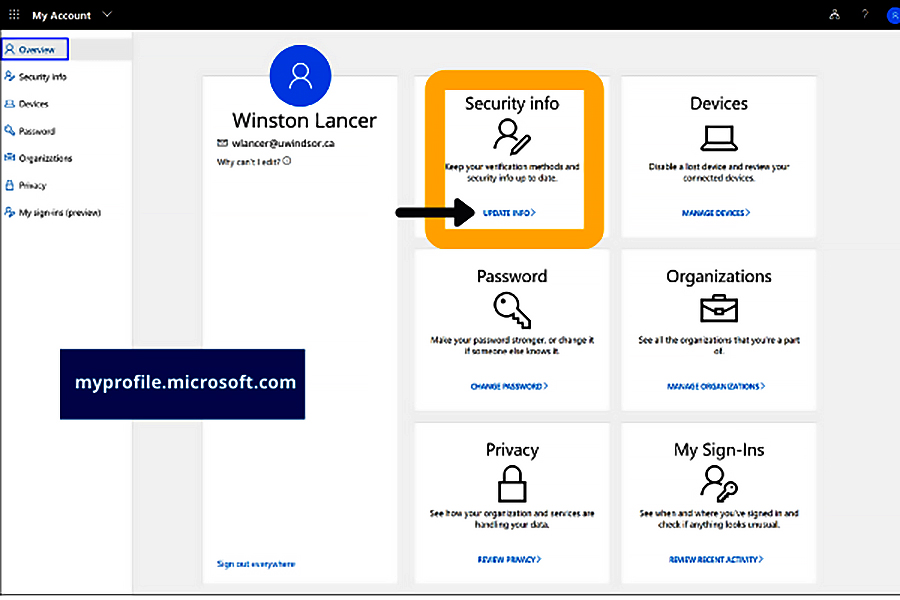
  1. Navigate to myprofile.microsoft.com in a web browser and sign in with your UWinID@uwindsor.ca and UWin Account password.
  2. In the Security info box, click the UPDATE INFO link.
  3. Click the + Add method button to add an authentication method. Authentication methods include Phone — text or call and Microsoft Authenticator App — verification code or notification.

To learn more about MFA, visit www.uwindsor.ca/itservices/multifactor. You can also ask a question or open a UWin Account ticket.

—Ericka Greenham

Jan 20th, 2020
MFA rollout at UWindsor will begin Jan. 30.

Multi-Factor Authentication (MFA) is a security feature to provide an additional level of identity verification to help prevent unauthorized access to UWindsor’s protected resources when they are being accessed from outside of the University’s networks – essentially from off-campus locations.

“MFA combines two or more independent credentials or "factors" -- what you know (e.g. your password) with something you have (e.g. your mobile phone),” says Marcin Pulcer, assistant director for client services in Information Technology Services. “This combination of factors creates a second layer of security for your UWin account.”

MFA rollout at UWindsor will begin Jan. 30. In preparation, all UWin account holders should set up their authentication options. To do so:

  1. Navigate to myprofile.microsoft.com in a web browser and sign in with your UWinID@uwindsor.ca and UWin Account password.

2. In the Security info box, click the UPDATE INFO link.

3. Click the + Add method button to add an authentication method.

  • Authentication methods include: Phone – text or call and Microsoft Authenticator App – verification code or notification.
  • While there are different authentication options, one of them will be designated as the default method. This can be changed at any time.
  • You can return to the Security info screen at any time to change or delete an authentication method.

It is strongly recommended that UWin account holders setup multiple authentication options for redundancy.

For more detailed information about authentication setup, see this knowledge base article.

Also note that once MFA is fully rolled out at UWindsor, setting up authentication options will be mandatory as access to UWindsor’s networks from off-campus locations will be denied without one.

“With the introduction of the new login process and MFA, UWindsor is enhancing its cybersecurity while easing the challenge of remembering and entering passwords,” says Pulcer. “In addition, once MFA is in place, the University’s password change interval will be extended from 120 days (or once per semester) to 365 days (or once per year).”

To learn more about MFA, visit www.uwindsor.ca/itservices/multifactor. You can also ask a question or open a UWin Account ticket.
graphic reading "authentication" with series of locks

The first of two changes to authentication at UWindsor will be introduced today — Thursday, Jan. 16.

  1. If you are using Windows 10 on a centrally managed device, after logging into your computer, you will gain access to several UWindsor online resources including Blackboard, Office 365, and UWinsite Finance without having to re-enter your UWinID@uwindsor.ca and UWin Account password. UWinsite Student will be added Friday.
  2. Otherwise, after logging into your computer, you will encounter new login pages when accessing UWindsor online resources. You will be prompted to enter your UWinID@uwindsor.ca and UWin Account password. In addition, if you log into at least one of Blackboard, Office 365, UWinsite Finance, or UWinsite Student, you can access the others without needing to re-enter your credentials.

“With the introduction of this new login process, we want to underscore the importance of locking, signing out or shutting down your device when it’s not in use — even if it just for a moment,” says Marcin Pulcer, assistant director of client services, Information Technology Services. “Failing to do so could expose your accounts and confidential information to others.”

To learn more about UWindsor’s new login process and how to properly protect your accounts, check the email sent yesterday or visit the IT Services website. You can also ask a question or open a UWin Account ticket.
series of cartoon locks

Two changes coming this month will make more secure the process of verifying the identities of users before allowing them access to campus networks, advises Information Technology Services.

“Authentication is important at UWindsor,” says Marcin Pulcer, assistant director of client services, IT Services. “It enables us to keep our networks secure by permitting only authenticated users to access our computer systems, databases, websites, and other network-based applications or services such as UWinsite Student and Blackboard.”

Later this month, IT Services will introduce two changes to authentication:

New Login Process

Starting Jan. 16, UWindsor faculty and staff using Windows 10 on a centrally managed device will be able to log in to their device and gain access to several UWindsor online resources without having to re-enter their credentials. If IT Services visited you during the Fall 2019 semester, this is likely you.

Other UWindsor community members (including students) will continue to log in to their devices. They will, however, see a new login page when accessing UWindsor online resources. And, once they have logged into one of these resources, they will gain access to others.

Multi-Factor Authentication

IT Services will enable Multi-Factor Authentication (MFA) starting Jan. 30, requiring a secondary credential or factor. This security feature provides an additional level of identity verification to help prevent unauthorized access to UWindsor’s protected resources when they are being accessed from outside of the University’s networks — largely from off-campus locations.

Before using MFA to access UWindsor applications, UWin Account holders (students, faculty, staff, applicants, retirees, etc.) will need to set up their secondary authentication factors. For instructions, read this knowledge base article.

It is important to note that once MFA is fully rolled out, setting up at least one secondary authentication factor will be mandatory as access to UWindsor’s networks from off-campus locations will be denied without it.

For more information about the new login process and MFA, see the IT Services website.

graphic representing Outlook mail

IT Services will upgrade student email accounts (UWinID@uwindsor.ca) from UWin Gmail to Outlook.

The University of Windsor is investing in this upgrade to provide students with:

  • the same email platform as faculty and staff, enhancing collaboration capabilities within the campus community;
  • a more integrated system with communication, creation, and collaboration tools all in one place; and
  • more secure email.

IT Services will pilot the Outlook upgrade with incoming Winter 2020 undergraduate students who have no previous student relationship with UWindsor. In addition, starting mid-January, students who accept offers of admission for future semesters will also use Outlook for their student email accounts instead of UWin Gmail.

The students involved in the pilot project will receive direct communication from IT Services in advance of the upgrade. New students currently receive a link to www.uwindsor.ca/studentemail when they extend their UWin Account. This link will continue to work and direct students to the appropriate email system.

All other students will continue to use their student email accounts in UWin Gmail until spring or summer 2020 when the upgrade of all student email accounts is scheduled to occur. www.uwindsor.ca/uwingmail will remain active for accessing UWin Gmail. In addition, UWin Gmail will be an option from www.uwindsor.ca/studentemail.

Please note there will be no change to UWinID@uwindsor.ca email addresses. It is only the tool students use for their email that is changing.

If you have a question about the upgrade of student email accounts to Outlook, share it with IT Services.

—Ericka Greenham