
Income Tax Forms for Students
Students may access their T2202 forms through their UWinsite Student account. T4A slips are available on UWinsite Student so log in and provide consent to receive your T4A under Account Services - Income Tax Form.
For T4As issued for OSAP funding, access it through your online account https://www.csnpe-nslsc.canada.ca/en/home.
Income tax forms for the previous calendar year will be available by February 28 at the latest.
Please ensure you have a valid address listed on your account prior to accessing your tax forms.
If you have issues, please email cashiers@uwindsor.ca or phone Cashiers at 519-253-3000 x3307.
T2202 -Tuition and Enrolment Certificate
T4A - Statement of Pension, Retirement, Annuity, and Other Income
Please update your profile and provide your Social Insurance Number (SIN) in UWinsite Student
A student’s Social Insurance Number (SIN) is required by UWindsor for:
- Processing of Ontario Student Assistance Program (OSAP) applications and the distribution of funding;
- Preparation of income tax documents for all students awarded a scholarship, bursary or other monetary award;
- A part of the documentation related to the employment relationship when students are hired for work by the University including employment funded through the work study program; and
- Beginning with the 2019 income tax year, preparation of the T2202 (Tuition and Enrolment Certificate) which is the tuition tax credit form provided to students by the University and may allow a student to reduce any income tax they may owe.
To provide your SIN:
1. In your web browser, preferably Google Chrome, go to https://www.uwindsor.ca/registrar/uwinsite-student.
2. Click the blue SIGN IN TO UWINSITE STUDENT button.
3. On the Sign in screen, enter (or select) your UWinID@uwindsor.ca. Click the Next button.
4. On the Enter password screen, enter your UWin Account password. Click the Sign in button.
5. On the Student Homepage, click the Profile tile.

6. In the left navigation menu, click Personal Details.
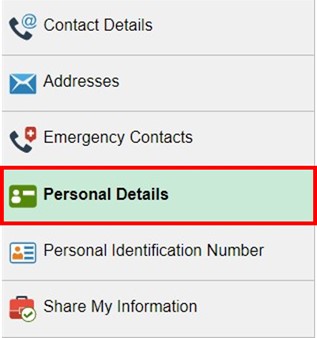
7. On the Personal Details page, click the Add SIN button.

8. In the Add SIN pop-up box, enter your SIN in the Social Insurance Number field. Your SIN must be entered in this format: XXX-XXX-XXX. Click the Save button.

9. You will receive a “Your Social Insurance Number has been updated successfully” message. Click the OK button.
10. On the Personal Details page, your National ID field will now be populated with a masked version of your SIN.
